The Only Missing Piece Was the DNS Record
I went looking for something else entirely. I was trying to work out whether www still
means anything on the modern web — the long version is here
— and the obvious first move was to try it on my own sites.
All four failed. Not "redirected oddly," not "served the wrong certificate." The browser couldn't find the host at all.
This is the first of those four, and it turned out to be the least dramatic and the most annoying kind of broken: everything hard was already done, and I had skipped the easy part.
What NXDOMAIN actually says
ERR_NAME_NOT_RESOLVED in a browser is DNS reporting NXDOMAIN, and it's worth being
precise about what that means, because it is not the same as "the site is down."
$ dig +noall +comment www.csv-helper.com A | grep status
;; ->>HEADER<<- opcode: QUERY, status: NXDOMAIN, id: 46157
NXDOMAIN is an authoritative statement that the name does not exist — not this record
type, not any record type, nothing at this label. It comes from the nameservers responsible
for the zone, so it isn't a guess or a timeout. The zone was asked whether it had ever heard
of www.csv-helper.com and it said no.
Compare that to the failure people usually mean by "down":
- NOERROR with no answer (sometimes called NODATA) — the name exists, but not with the
record type you asked for. A hostname with only a
TXTrecord answers this way to anAquery. Something is there; it just isn't what you wanted. - SERVFAIL — the resolver tried and something went wrong. Broken DNSSEC, unreachable authoritative servers.
- Timeout — nobody answered at all.
- NOERROR with an answer, then a dead connection — DNS is fine and the server is the problem. This is what "the site is down" normally looks like.
Only the first of those is what I had. There was no server problem to find, because there was no server being asked. The request never got far enough to be a web problem.
That distinction matters more than it looks. A site that's down gets noticed, because
something monitors it. A hostname that was never created is silent forever — there's no
error rate to alert on, no 500s in a log, no certificate expiry warning. The only signal is
a person typing the habitual www. and quietly concluding you don't exist.
The state before
Here's the zone as I found it. Five records:
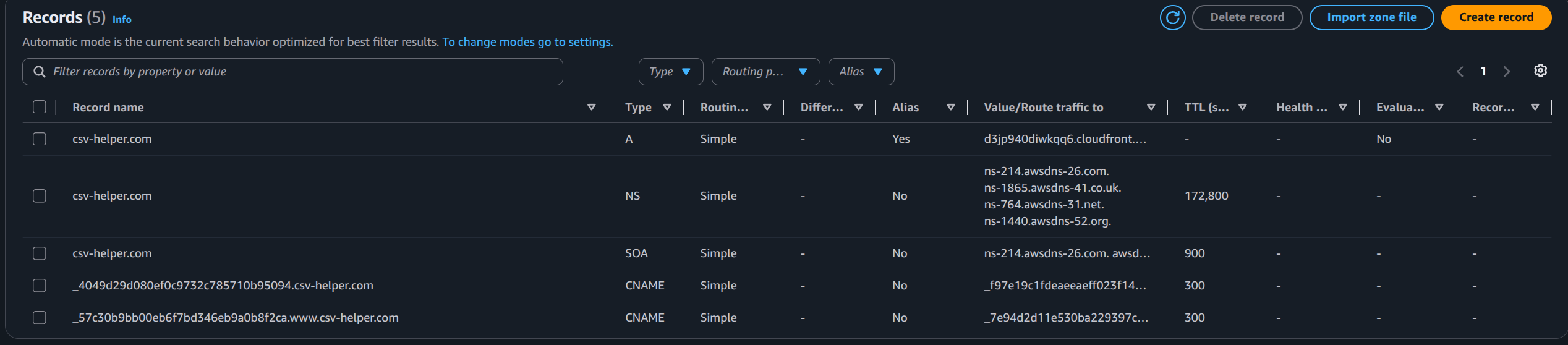
Reading them in order:
csv-helper.comA, Alias →d3jp940diwkqq6.cloudfront.net. The apex points at a CloudFront distribution. CloudFront won't give you a stable IP, so what you want here is "follow this hostname" — which is a CNAME, and a CNAME is the one thing a zone apex can never hold. Route 53's alias record is the way around that: it looks like a CNAME to you and resolves to a plain A record on the wire. Why the apex can't take a CNAME is worth its own read — the restriction is one sentence from 1987 and it's a large part of whywwwoutlived its usefulness.csv-helper.comNS — the four AWS nameservers this zone is delegated to.csv-helper.comSOA — start of authority. More on this one later; it turns out to matter._4049d29d….csv-helper.comCNAME →…acm-validations.aws— an ACM DNS validation record, proving to Amazon that I control the apex._57c30b9b….**www**.csv-helper.comCNAME →…acm-validations.aws— an ACM validation record for www.
That fifth record is the tell. ACM only creates a validation record for a name you actually
asked it to certify. Past me had requested a certificate covering www.csv-helper.com,
completed the validation, and then never created the record that would let anyone reach it.
Three things have to be true
For https://www.example.com to work behind CloudFront, three independent things must line
up, and they fail in ways that look nothing alike:
- The name resolves. DNS has a record for
www. Otherwise: NXDOMAIN, and the browser never opens a socket. - The distribution answers to that name. CloudFront matches the incoming
Hostheader against its alternate domain names. Otherwise: a 403 from CloudFront itself, withx-cache: Error from cloudfront, regardless of what your origin holds. - The certificate covers that name. The TLS handshake presents a cert whose SAN list includes the hostname. Otherwise: a browser-level certificate warning, which is the most alarming of the three to a visitor.
The ordering is worth internalising, because the natural instinct is exactly backwards. DNS is the easy one to change, so it's tempting to add it first and see what happens. But adding DNS first, when the other two aren't ready, converts a name that doesn't exist into a name that exists and is broken — a 403 or a certificate warning. To a visitor that's a worse outcome than NXDOMAIN, because it looks like your site is misconfigured rather than absent. Do DNS last.
So before touching anything, I wanted to know which of the three were actually missing.
Is the certificate right? You don't need AWS access to answer this. The cert is public — the server hands it to anyone who connects:
$ openssl s_client -connect csv-helper.com:443 -servername csv-helper.com </dev/null 2>/dev/null \
  | openssl x509 -noout -subject -dates -ext subjectAltName

subject=CN=csv-helper.com
notBefore=May  8 00:00:00 2026 GMT
notAfter=Nov 21 23:59:59 2026 GMT
X509v3 Subject Alternative Name:
    DNS:csv-helper.com, DNS:www.csv-helper.com
There it is — DNS:www.csv-helper.com, in the live certificate, already valid. Item three
was done.
Does CloudFront accept the name? This one seems to need the DNS record first, which is the chicken-and-egg the ordering advice creates. It doesn't. You can fake the DNS resolution for a single request and ask CloudFront directly:
$ curl -sS -D - -o /dev/null \
    --connect-to www.csv-helper.com:443:d3jp940diwkqq6.cloudfront.net:443 \
    https://www.csv-helper.com/

HTTP/2 200
server: AmazonS3
x-cache: Hit from cloudfront
via: 1.1 ad507bcfe99c81948771b1a0e96a9ad0.cloudfront.net (CloudFront)
--connect-to tells curl to open the TCP connection to the CloudFront hostname, while
still using www.csv-helper.com for SNI and for the Host header. It's exactly the request
the browser would send if the DNS record existed. A 200 means CloudFront already had the
name in its alternate domain names — a distribution that doesn't recognise the Host returns
403 here, not 200.
That's a genuinely useful trick beyond this one case: it lets you validate a CloudFront and certificate configuration before you publish DNS, so you never expose the broken intermediate state.
Two of three confirmed working. The whole outage was one missing record.
The fix, in the console
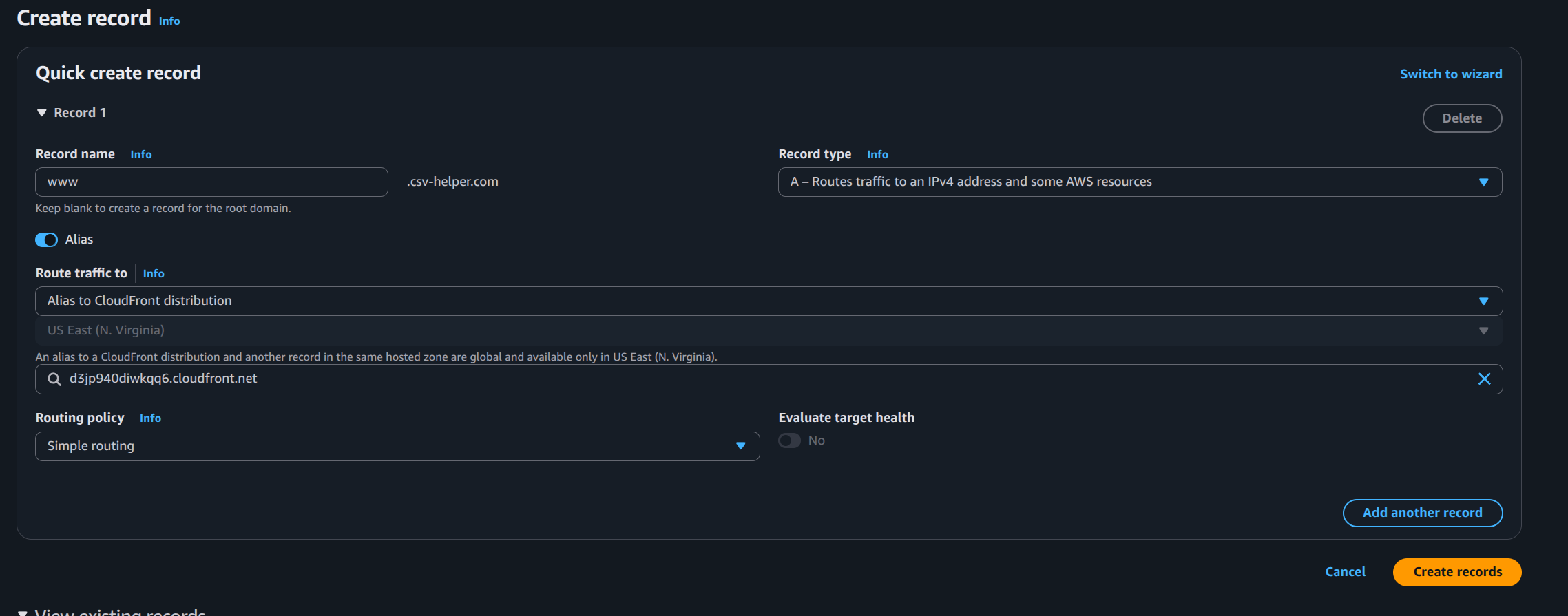
Record name www, type A, Alias on, routing to the same CloudFront distribution as the
apex, simple routing policy. Nothing exotic.
The one field that confuses people is Alias to CloudFront distribution followed by a
locked, greyed-out US East (N. Virginia). That isn't asking where your distribution runs
— CloudFront is global. It's a consequence of CloudFront's control plane living in
us-east-1, which is the same reason ACM certificates for CloudFront must be requested
there and nowhere else. The console is telling you it already knows the answer.
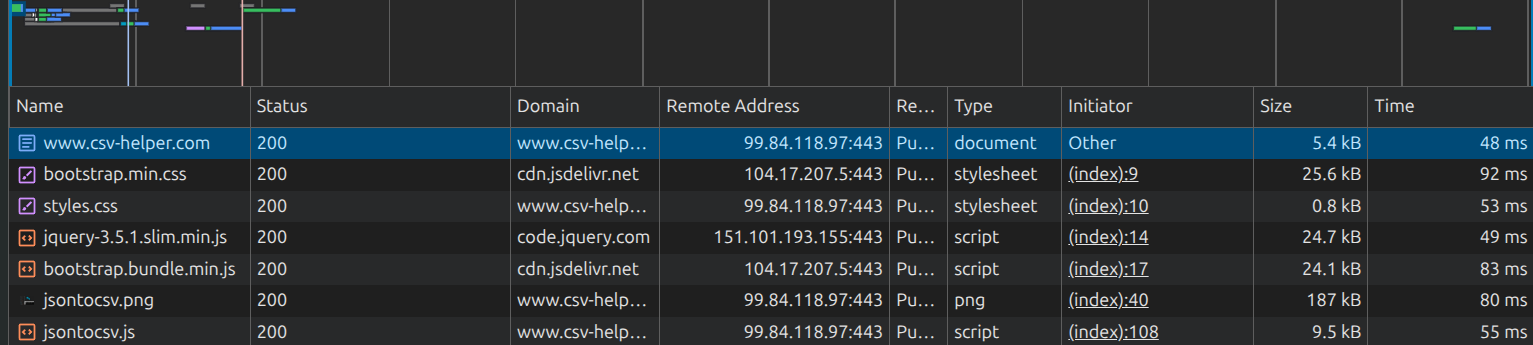
And it works:
The thing that makes fixes feel like they didn't work
Immediately after, from my laptop:
$ dig +short www.csv-helper.com A
                                    # nothing
Empty. Meanwhile the browser was loading the site fine. The record was live — asking the authoritative nameserver directly proved it:
$ dig @ns-214.awsdns-26.com +short www.csv-helper.com A
99.84.118.97
99.84.118.49
99.84.118.126
99.84.118.72
My resolver was still serving the cached NXDOMAIN from when I'd checked twenty minutes earlier. And this is where that SOA record from the zone listing turns out to matter:
$ dig @ns-214.awsdns-26.com +short csv-helper.com SOA
ns-214.awsdns-26.com. awsdns-hostmaster.amazon.com. 1 7200 900 1209600 86400
                                                                      ^^^^^
That last field is the negative caching TTL — how long resolvers are permitted to remember that a name doesn't exist. Route 53's default is 86400 seconds. A full day.
Positive records have their own TTLs and people think about them constantly when planning a
migration. Almost nobody thinks about the negative one, because it only bites in a specific
situation: you create a name that someone already asked for and got told didn't exist. Which
is precisely the situation of fixing a missing www. The people most likely to have tried
it are the people whose resolvers now hold a day-long grudge.
There's nothing to do about it after the fact — you can't invalidate a negative cache you don't own. The lesson is only that "I fixed it and it's still broken" is an expected state here, and the way to confirm your own work is to query the authoritative nameservers directly rather than trusting whatever your laptop's resolver believes.
While I was in there: IPv6
The apex had an A alias and no AAAA. The distribution behind it supports IPv6 perfectly
well:
$ dig +short d3jp940diwkqq6.cloudfront.net AAAA
2600:9000:2162:e200:14:9b8f:1380:93a1
2600:9000:2162:200:14:9b8f:1380:93a1
So the site was IPv4-only to clients purely because I'd never created the record. Since I
was already in the zone, I added AAAA aliases for both names — and this time via the CLI,
because four records typed into a web form is three too many.
Route 53 changes are submitted as a JSON change batch:
{
  "Comment": "Add IPv6 (AAAA) aliases for apex and www to the CloudFront distribution",
  "Changes": [
    {
      "Action": "UPSERT",
      "ResourceRecordSet": {
        "Name": "csv-helper.com",
        "Type": "AAAA",
        "AliasTarget": {
          "HostedZoneId": "Z2FDTNDATAQYW2",
          "DNSName": "d3jp940diwkqq6.cloudfront.net",
          "EvaluateTargetHealth": false
        }
      }
    },
    {
      "Action": "UPSERT",
      "ResourceRecordSet": {
        "Name": "www.csv-helper.com",
        "Type": "AAAA",
        "AliasTarget": {
          "HostedZoneId": "Z2FDTNDATAQYW2",
          "DNSName": "d3jp940diwkqq6.cloudfront.net",
          "EvaluateTargetHealth": false
        }
      }
    }
  ]
}
Two details in there are easy to get wrong.
UPSERT rather than CREATE. CREATE fails if the record already exists, which makes the
batch non-idempotent and turns a re-run into an error instead of a no-op.
Z2FDTNDATAQYW2 is not my hosted zone. It's a fixed constant meaning "CloudFront" — every
alias to any CloudFront distribution in any AWS account uses that same value. The
HostedZoneId inside an AliasTarget identifies the target service, while the
--hosted-zone-id flag on the command identifies your zone. Two different things, same
field name, and mixing them up is the classic first mistake.
$ aws route53 change-resource-record-sets \
    --hosted-zone-id Z01001021A0BTVHLNMG82 \
    --change-batch file://csv-helper-aaaa.json \
    --query 'ChangeInfo.[Id,Status]' --output text

/change/C02291241YVGTOHT75F84   PENDING

$ aws route53 wait resource-record-sets-changed --id /change/C02291241YVGTOHT75F84
$ aws route53 list-resource-record-sets --hosted-zone-id Z01001021A0BTVHLNMG82 \
    --query "ResourceRecordSets[?Type=='A'||Type=='AAAA'].[Name,Type,AliasTarget.DNSName]" \
    --output text

csv-helper.com.        A     d3jp940diwkqq6.cloudfront.net.
csv-helper.com.        AAAA  d3jp940diwkqq6.cloudfront.net.
www.csv-helper.com.    A     d3jp940diwkqq6.cloudfront.net.
www.csv-helper.com.    AAAA  d3jp940diwkqq6.cloudfront.net.
route53 wait is the part worth stealing. Route 53 returns PENDING immediately and
propagates asynchronously; the wait subcommand polls until the change reports INSYNC, so
a script doesn't have to guess at a sleep.
How much did the IPv6 gap actually cost?
Almost nothing, and I'd rather say that than pretend I'd fixed something urgent.
A dual-stack client doesn't pick one protocol and fail. Browsers implement Happy Eyeballs
(RFC 8305): they request A and AAAA in parallel, start connecting on whichever answers
first, and fall back to the other almost instantly if it stalls. A missing AAAA just means
every client takes the IPv4 path — which was working fine.
Even genuinely IPv6-only networks — some mobile carriers run this way — handle it. NAT64 and
DNS64 synthesize an AAAA from your A record and translate at the network edge. The
client thinks it's speaking IPv6 to you the whole time.
So the honest accounting is that adding AAAA was cheap, marginally better, and not the
repair of an outage. It removes a translation hop for a small slice of traffic. I'm noting
it because "this mattered less than the effort suggests" is the kind of thing people leave
out of writeups, and leaving it out is how everything ends up sounding equally urgent.
There's a small joke at the end of this one: I couldn't verify it end-to-end from my own machine.
$ ip -6 route show default        # empty
$ curl -6 https://ipv6.google.com/
curl: (7) Failed to connect ... Could not connect to server
My laptop has no IPv6 connectivity at all. I'd just spent twenty minutes enabling a protocol I can't reach.
What I deliberately left broken
Both csv-helper.com and www.csv-helper.com now return an identical 200, and there's no
<link rel="canonical"> anywhere in the HTML. Nothing declares which one is the real
address. That's a genuine (if mild) SEO duplicate-content problem and I know how to fix it —
a CloudFront Function on viewer-request that 301s www to the apex is about ten lines.
I'm leaving it. This site is going to be a test fixture.
The scanner this whole thing is leading to has to classify canonical direction: does www
redirect to apex, does apex redirect to www, or do both serve independently with no
canonical form. That third case is the hardest to get right, because nothing is failing —
everything returns 200, and a classifier that only looks for errors sails straight past it.
Having a domain I control parked in exactly that state means I can assert the classifier
buckets it correctly, then add the redirect and assert it moves.
A test set is worth more than a tidy config, at least for now.
I said four. There were six.
With one domain fixed I went to do the next one, and stopped at the first step: I was about to work from the same mental list I'd used to open this investigation. That list was produced by me sitting and thinking of domains I own. It is not a source of truth about anything.
So I asked the account instead:
for z in $(aws route53 list-hosted-zones --query 'HostedZones[].Name' --output text); do
  d=${z%.}
  printf '%-24s apex-A:%-5s apex-AAAA:%-5s www-A:%-5s www-AAAA:%s\n' "$d" \
    "$([ -n "$(dig +short "$d" A)" ]     && echo ok || echo MISS)" \
    "$([ -n "$(dig +short "$d" AAAA)" ]  && echo ok || echo MISS)" \
    "$([ -n "$(dig +short "www.$d" A)" ] && echo ok || echo MISS)" \
    "$([ -n "$(dig +short "www.$d" AAAA)" ] && echo ok || echo MISS)"
done
Seventeen hosted zones. Eleven of them are parked — no apex A, nothing served, and a
missing www on a domain that resolves to nothing isn't a bug, it's just an unused
registration. Six were live. I had said four.
| domain | apex A | apex AAAA | www A | www AAAA |
|---|---|---|---|---|
| csv-helper.com | ok | ok | ok | ok |
| apresapply.com | ok | MISS | MISS | MISS |
| unpivot-sql.com | ok | MISS | MISS | MISS |
| thomasrones.com | ok | MISS | MISS | MISS |
| fxf.social | ok | ok | MISS | MISS |
| talktop.us | ok | MISS | ok | MISS |
Two domains I'd forgotten I was serving, and a fifth broken site I'd have never gone looking for. The opening claim of this whole investigation — all four of my domains fail — was wrong in the direction that flatters me. It was five out of six.
I want to be clear about how small the effort was that corrected it. That loop is nine lines, it took under a minute to write, and it found a broken production site I owned and had no idea about. The reason I'd never run it isn't that it was hard. It's that I already believed I knew the answer, and there's no prompt anywhere in AWS to check.
The same failure, five times, with different pieces missing
I expected the remaining four to differ. fxf.social in particular looked like a distinct
species — it had IPv6 on the apex and no www at all, the reverse of everything else.
They were identical. Not similar: identical. For every one of them, exactly as with
csv-helper.com, the distribution already listed www.<domain> in its alternate domain
names, already reported IsIPV6Enabled: true, and already presented a certificate covering
the www name — sometimes as an explicit SAN, sometimes as a wildcard. Every check I'd
built up for this article came back green before I changed anything:
$ aws cloudfront list-distributions \
    --query "DistributionList.Items[?DomainName=='d3jmdz8yzgud49.cloudfront.net'].{Aliases:Aliases.Items,IPv6:IsIPV6Enabled}"

[{ "Aliases": ["fxf.social", "www.fxf.social"], "IPv6": true }]

$ curl -sS -o /dev/null -w '%{http_code}\n' \
    --connect-to www.fxf.social:443:d3jmdz8yzgud49.cloudfront.net:443 \
    https://www.fxf.social/
200
Steps two and three, done and waiting, on all of them. Not one required a distribution edit or a re-issued certificate. Five sites, and the entire remediation was DNS records that had never been typed.
What varied was only which records existed. fxf.social had an apex A and an apex
AAAA and nothing for www; three others had an apex A and nothing else; talktop.us
had both A records and neither AAAA. There's no configuration in which those are
different decisions. That's the fingerprint of records entered by hand, one at a time,
months apart, each session ending whenever the thing I was actually trying to do started
working. Nobody misconfigured anything. The work just stopped at a different point each
time.
That reframes the failure for me, and it's the part I'd want someone else to take away. I'd been treating this as carelessness — past me being sloppy five times. It isn't. CloudFront will hold an alternate domain name forever without ever mentioning that no DNS points at it. ACM will renew a certificate for a SAN that has never once appeared in a handshake. Route 53 has no opinion about a zone being incomplete, because it has no idea what complete would mean. Three services each hold one third of the answer, none of them can see the other two, and the combination that's broken is invisible to all of them.
There is no error state here. That's the whole problem. A misconfiguration produces a 403 or a certificate warning and somebody eventually notices; this produces silence, and silence is indistinguishable from a domain you meant to leave alone. The only instrument that detects it is a request for the hostname from outside, which is the one thing none of the three services is in a position to make.
The negative cache got me one more time on the way out, too. Right after adding the
www.fxf.social records, dig +short www.fxf.social AAAA came back empty — while the A
record on the same name resolved fine, which made no sense at all for two records written
in the same change batch. Same lesson as before, one level down: my resolver had cached the
NODATA from the survey loop I'd run twenty minutes earlier. The authoritative nameservers
had the record the whole time. I'd written the section above about exactly this and still
spent a few minutes confused by it.
I left talktop.us alone. It's the only one where www already worked, it's missing IPv6
only, and it's due for a redeploy that will rebuild the zone anyway — fixing records that
are about to be replaced is work I'd have to do twice.
Was it worth the afternoon?
I genuinely don't know, and I want to be straight about the reasoning rather than pretend this was obviously good practice.
When you're running a dozen small projects, everything is a bit broken all the time. This
site had working HTTPS and did the thing it exists to do. Elsewhere in the portfolio there's
a page with two phone mockups that are supposed to contain screen recordings I've never got
round to making. You triage constantly, and "www doesn't resolve" sits far below "the
thing doesn't work at all" on any sane list. I'd looked at gaps like this before and thought
nobody types www anymore and moved on, which is a real argument and also a very
convenient one.
What I'd say in defence of going back is that the fix was not the valuable part. The fix was
one record. The valuable part was being forced to actually look: to find out that past me
had already provisioned the certificate and configured the distribution and stopped one step
short, to learn what the SOA's last field does by getting confused by it, to discover the
--connect-to trick because I wanted to avoid publishing a broken state, and to find out
that my own laptop has no IPv6.
None of that is knowledge I'd have gone looking for deliberately. It's the kind you only get by picking one small broken thing and refusing to wave it off.
The four that followed took about twenty minutes between them, which is the usual shape of this: the first instance is an investigation and the rest are a loop. But finishing them made the original question worse rather than better. I now have a clean number — five of my six live domains were serving a hostname that didn't resolve — and it's still a number about one person, who provisions every site the same way, out of the same habit, in the same console. Five out of six is either a fact about the web or a fact about me, and nothing I can measure inside my own account will tell me which.
That's the whole argument for the scanner, and I didn't really feel it until the fixes were done. I wasn't missing a fix. I was missing a denominator.
Comments
No comments yet. Be the first!